
The term test doubles draws inspiration from stunt doubles in the movie industry, where a stunt double steps in to perform dangerous or complex tasks, allowing the actor to focus on their role. Similarly, in software testing, test doubles step in to replace real components, making testing simpler, faster, and more reliable.
Testing is an essential part of software development, ensuring the correctness and reliability of our code. However, when we test systems with many dependencies—like databases, web services, or external APIs—writing reliable tests can become challenging. This is where test doubles come in handy.

Replacing real dependencies with controlled test doubles
It’s important to understand the basics of unit testing first (see Gentle Introduction to Unit Testing), especially since some architectures, like MVC with logic packed into view controllers, can make code harder to test. Familiarity with the FIRST principles—Fast, Independent, Repeatable, Self-validating, and Timely—is crucial for writing effective tests. Additionally, it’s vital to recognize that flaky tests, which produce inconsistent results, can undermine the reliability of your testing suite and lead to wasted time and effort.
In this post, we’ll explore the different types of test doubles, their purpose, and practical examples. By the end, you’ll be able to confidently use them to create more effective, reliable tests.
What is a Test Double?
A test double is a substitute that stands in for a real dependency during testing. These dependencies, which can include external services, databases, or complex components, often introduce complexity that makes testing challenging. Test doubles enable us to isolate the code under test and concentrate on specific behaviors, resulting in more predictable and efficient tests. By using test doubles, we can create controlled environments that facilitate thorough testing without the overhead of managing real dependencies.
Test doubles mimic the behavior of real dependencies, but they provide simplified or controlled implementations. By replacing real dependencies with test doubles, we create an environment where we control every interaction, avoiding side effects from external systems.
Types of Test Doubles
The most widely used vocabulary comes from Gerard Meszaros’s book xUnit Test Patterns, which describes five types of test doubles, each serving a distinct purpose:
- Dummy
- Fake
- Stub
- Spy
- Mock
Let’s dive into each of these with practical Swift examples. We’ll use a sample UserManager class whose dependencies were picked to demonstrate every type of test double. In a real project, you may need several different doubles for the same dependency, depending on what each test needs. To keep this example short, we create only one test double per dependency.
UserManager receives its dependencies through its initializer, with default values for production use. This is called initializer injection, a form of dependency injection.
// UserManager.swift
class UserManager {
    let loggerService: LoggerService
    let cacheService: CacheService
    let database: DatabaseHelper
    let securityHelper: SecurityHelper
    let notificationService: NotificationService

    init(
        logger: LoggerService = LoggerServiceImpl(),
        cache: CacheService = CacheServiceImpl(),
        database: DatabaseHelper = DatabaseHelperImpl(),
        securityHelper: SecurityHelper = SecurityHelperImpl(),
        notificationService: NotificationService = NotificationServiceImpl()
    ) {
        self.loggerService = logger
        self.cacheService = cache
        self.database = database
        self.securityHelper = securityHelper
        self.notificationService = notificationService
    }

    func authenticate(username: String, password: String) -> Bool {
        loggerService.log("Authenticating user \(username)") // Never log passwords

        // Check cache first
        if let cachedPasswordHash = cacheService.get(username) {
            loggerService.log("Cache hit for user \(username)")
            let success = cachedPasswordHash == password.hashed()
            securityHelper.recordAuthenticationAttempt(username: username, success: success)
            notificationService.sendAuthenticationEmail(username: username, success: success)
            return success
        }

        // Fetch from database if not in cache
        loggerService.log("Cache miss for user \(username)")
        if let passwordHash = database.getUserPasswordHash(username: username) {
            cacheService.set(username, value: passwordHash)
            let success = passwordHash == password.hashed()
            securityHelper.recordAuthenticationAttempt(username: username, success: success)
            notificationService.sendAuthenticationEmail(username: username, success: success)
            return success
        }

        loggerService.log("Authentication failed for user \(username)")
        securityHelper.recordAuthenticationAttempt(username: username, success: false)
        notificationService.sendFailedAuthenticationAttemptEmail(username: username, success: false)
        return false
    }

    func register(username: String, password: String) -> Bool {
        // Check if the username is valid
        guard !username.isEmpty, !password.isEmpty else {
            loggerService.log("Registration failed: Username or password is empty.")
            return false
        }

        // Check if the username already exists in the database
        if database.getUserPasswordHash(username: username) != nil {
            loggerService.log("Registration failed: Username \(username) already exists.")
            return false // Username already taken
        }

        // Hash the password for storage
        let passwordHash = password.hashed()

        // Add the user to the database
        database.addUser(username: username, passwordHash: passwordHash)

        // Optionally, cache the newly created user
        cacheService.set(username, value: passwordHash)

        // Log the successful registration
        loggerService.log("User \(username) registered successfully.")

        // Send a notification email (optional)
        notificationService.sendRegistrationEmail(username: username, success: true)

        return true
    }

}
Below are the protocols that describe our dependencies. For example, the LoggerService protocol is implemented both by LoggerServiceImpl (used in production) and by DummyLogger (used in tests). The same goes for every other dependency: each protocol can be implemented by either a real type or a test double, so we can plug whichever one we need into UserManager. This is what makes the code testable.
// LoggerService.swift
protocol LoggerService {
    func log(_ message: String)
}
// CacheService.swift
protocol CacheService {
    func get(_ key: String) -> String?
    func set(_ key: String, value: String)
}
// DatabaseHelper.swift
protocol DatabaseHelper {
    func getUserPasswordHash(username: String) -> String?
    func addUser(username: String, passwordHash: String)
}
// SecurityHelper.swift
protocol SecurityHelper {
    func recordAuthenticationAttempt(username: String, success: Bool)
}
// NotificationService.swift
protocol NotificationService {
    func sendAuthenticationEmail(username: String, success: Bool)
    func sendRegistrationEmail(username: String, success: Bool)
    func sendFailedAuthenticationAttemptEmail(username: String, success: Bool)
}
Below is a simple “hasher”, simplified for demo purposes. Real apps should never store or compare passwords like this: use a slow, salted password hashing algorithm, ideally on the server.
// String+Hasher.swift
extension String {
    func hashed() -> String {
        return "hashed_\(self)" // Simplified hash for demo purpose.
    }
}
Below are the implementations we use in production code. They’re useful to compare against when reading the test double examples.
// LoggerServiceImpl.swift
import os

class LoggerServiceImpl: LoggerService {
    private let logger = Logger(subsystem: Bundle.main.bundleIdentifier ?? "com.yourapp", category: "default")
    func log(_ message: String) {
        logger.log("Log: \(message)")
    }
}
// CacheServiceImpl.swift
class CacheServiceImpl: CacheService {
    private let userDefaults = UserDefaults.standard

    func get(_ key: String) -> String? {
        return userDefaults.string(forKey: key) // Retrieve value from UserDefaults
    }

    func set(_ key: String, value: String) {
        userDefaults.set(value, forKey: key) // Store value in UserDefaults
    }
}
Note: UserDefaults should never be used to store sensitive data like passwords, even hashed ones. Use the Keychain for that. It’s only used here for demo purposes. ```swift // DatabaseHelperImpl.swift class DatabaseHelperImpl: DatabaseHelper { private var users: [String: String] = [:] // Simulated user password storage
func getUserPasswordHash(username: String) -> String? {
    return users[username] // Retrieve password hash for the given username
}

func addUser(username: String, passwordHash: String) {
    users[username] = passwordHash // Add user to the simulated database
} } ``` ```swift // SecurityHelperImpl.swift class SecurityHelperImpl: SecurityHelper {
private let logFileURL: URL

init() {
    let documentsURL = FileManager.default.urls(for: .documentDirectory, in: .userDomainMask).first!
    logFileURL = documentsURL.appendingPathComponent("authentication_log.txt")
}

func recordAuthenticationAttempt(username: String, success: Bool) {
    // One tab-separated line per attempt: timestamp, username, result
    let timestamp = ISO8601DateFormatter().string(from: Date())
    let logEntry = "\(timestamp)\t\(username)\t\(success ? "Success" : "Failure")\n"

    do {
        if let handle = try? FileHandle(forWritingTo: logFileURL) {
            // Append to the existing log
            defer { try? handle.close() }
            try handle.seekToEnd()
            try handle.write(contentsOf: Data(logEntry.utf8))
        } else {
            // First attempt: create the file
            try logEntry.write(to: logFileURL, atomically: true, encoding: .utf8)
        }
    } catch {
        print("Error writing to log file: \(error)")
    }
}

func readAuthenticationAttempts() -> [(username: String, success: Bool)] {
    guard let logContents = try? String(contentsOf: logFileURL, encoding: .utf8) else {
        return []
    }

    return logContents.split(separator: "\n").compactMap { line in
        let fields = line.split(separator: "\t", omittingEmptySubsequences: false)
        guard fields.count == 3 else { return nil }
        return (username: String(fields[1]), success: fields[2] == "Success")
    }
} } ``` ```swift // NotificationServiceImpl.swift class NotificationServiceImpl: NotificationService {
func sendAuthenticationEmail(username: String, success: Bool) {
    // Here you could implement logic to send an email notification
    print("Sent authentication email to \(username): \(success ? "Success" : "Failure")")
}

func sendFailedAuthenticationAttemptEmail(username: String, success: Bool) {
    // Here you could implement logic to send an email notification for a failed attempt
    print("Sent failed authentication attempt email to \(username)")
}

func sendRegistrationEmail(username: String, success: Bool) {
    // Here you could implement logic to send an email notification for registration
    print("Sent registration email to \(username)")
} } ```
Now that we’re familiar with UserManager, let’s explore the different types of test doubles, along with examples and further details.
1. Dummies
A dummy test double is the simplest form of a test double. It’s used when a parameter is required by the method signature but isn’t actually used by the method itself. It’s essentially a placeholder to satisfy the API.
Example:
// DummyLogger.swift
class DummyLogger: LoggerService {
    func log(_ message: String) {
        // No-op: This dummy logger does nothing
    }
}
In this example, DummyLogger satisfies the LoggerService protocol but doesn’t do anything. Notice that it has no Logger. It exists only to fulfill the initializer’s requirements, because none of our tests care about logging.
Note: Strictly speaking, a dummy is never used at all, only passed around.
UserManagerdoes calllog(_:), so a do-nothing logger like this one is technically closer to a stub that returns nothing, also known as a null object. In practice, many developers call any placeholder the tests don’t care about a dummy. A stricter dummy would callfatalError()in its methods, to prove the code under test never touches it.
If we had a complicated logging system that needed testing, we would create a different test double for LoggerService. Here, the logger is simply the easiest dependency to use for demonstrating a dummy.
2. Fakes
A fake object provides a working implementation, but it is simpler and often less efficient than the real one. Fakes are often used to simulate databases or services during testing.
Example:
class FakeDatabase: DatabaseHelper {
    var users: [String: String] = [:] // Simulated user password storage

    func getUserPasswordHash(username: String) -> String? {
        return users[username]
    }

    // Helper method to add users to the fake database
    func addUser(username: String, passwordHash: String) {
        users[username] = passwordHash
    }
}
Here, FakeDatabase simulates a database with an in-memory dictionary, so tests can run without a real database. It really works: users you add can be read back later, just like with the real thing.
In this demo, the production DatabaseHelperImpl happens to be just as simple. In a real app, it would talk to SQLite, Core Data, or SwiftData, and a fake like this one is what lets your tests stay fast and independent of that storage.
3. Stubs
A stub is a test double that provides predefined answers to method calls. Stubs don’t perform any logic; they just return canned responses. Stubs are helpful when you want to control the return values of a dependency in a test scenario.
Example:
// StubCache.swift
class StubCache: CacheService {
    var cachedValue: String? // The canned answer: nil simulates a cache miss

    func get(_ key: String) -> String? {
        return cachedValue // Same answer for every key
    }

    func set(_ key: String, value: String) {
        // Ignored: a stub answers questions, it doesn't remember anything
    }
}
Setting cachedValue = "hashed_password123" puts UserManager on the cache-hit path, and leaving it nil forces the cache-miss path, without involving UserDefaults at all.
Note: Stubs provide canned responses to method calls, while fakes provide a simplified implementation of the real thing. If
StubCachestored values in a dictionary insetand returned them fromget, it would be a working cache, and therefore a fake, likeFakeDatabase.
4. Spies
A spy is a test double that records information about the interactions with its methods, such as how many times a method was called or with what arguments. This makes it useful for verifying side effects in your tests.
Example:
// SpySecurityHelper.swift
class SpySecurityHelper: SecurityHelper {
    var recordedAttempts: [(username: String, success: Bool)] = []

    func recordAuthenticationAttempt(username: String, success: Bool) {
        recordedAttempts.append((username, success))
    }

    // Helper method to check whether a specific attempt was recorded
    func verifyAttempt(username: String, success: Bool) -> Bool {
        return recordedAttempts.contains { $0.username == username && $0.success == success }
    }

    // Helper method to check the total number of attempts
    func verifyTotalAttempts(expectedCount: Int) -> Bool {
        return recordedAttempts.count == expectedCount
    }
}
SpySecurityHelper is much simpler than the original implementation. Instead of writing to a file, it records every authentication attempt in memory, so a test can check afterwards that UserManager reported the right attempts.
5. Mocks
A mock is the most sophisticated type of test double. You tell it up front which calls to expect, and it verifies by itself that exactly those calls happened. In other languages, mocks are usually generated by mocking frameworks. In Swift, they’re most often written by hand.
Example:
// MockNotificationService.swift
import XCTest

class MockNotificationService: NotificationService {
    enum Email: Equatable {
        case authentication(username: String, success: Bool)
        case registration(username: String, success: Bool)
        case failedAuthenticationAttempt(username: String)
    }

    private var expectedEmails: [Email] = []
    private var sentEmails: [Email] = []

    // Arrange: describe the emails the test expects, in order
    func expect(_ email: Email) {
        expectedEmails.append(email)
    }

    func sendAuthenticationEmail(username: String, success: Bool) {
        sentEmails.append(.authentication(username: username, success: success))
    }

    func sendRegistrationEmail(username: String, success: Bool) {
        sentEmails.append(.registration(username: username, success: success))
    }

    func sendFailedAuthenticationAttemptEmail(username: String, success: Bool) {
        sentEmails.append(.failedAuthenticationAttempt(username: username))
    }

    // Assert: fails the test if the emails sent don't match the expectations
    func verify(file: StaticString = #filePath, line: UInt = #line) {
        XCTAssertEqual(sentEmails, expectedEmails, "Unexpected notification emails", file: file, line: line)
    }
}
A test then reads like this:
mockNotificationService.expect(.authentication(username: "john_doe", success: true))
_ = userManager.authenticate(username: "john_doe", password: "password123")
mockNotificationService.verify()
Note: The difference between a spy and a mock is who checks. A spy only records what happened, and the test asserts on the recording afterwards. A mock is given its expectations beforehand and does the verification itself. Because each email type is a separate
Sample Code
It’s best to try out the code in a real project. You can download the source code here.
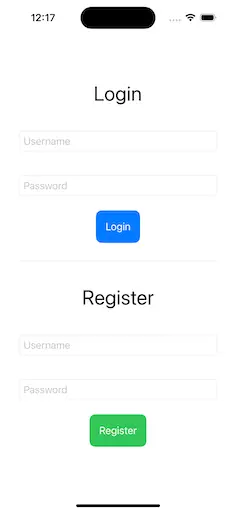
Simple SwiftUI Screen
Conclusion
Test doubles are a powerful concept that can significantly improve the reliability and maintainability of your tests. Whether you’re using dummies, fakes, stubs, spies, or mocks, each type of test double serves a unique purpose in ensuring your code is thoroughly tested in isolation.
By understanding when and how to use each type, you’ll be able to write more focused and effective unit tests in Swift, ensuring your code is both high quality and easier to maintain.
Happy testing! 🎉
Continue with testing asynchronous code and avoiding flaky tests, or return to the eight-article Testing roadmap.